
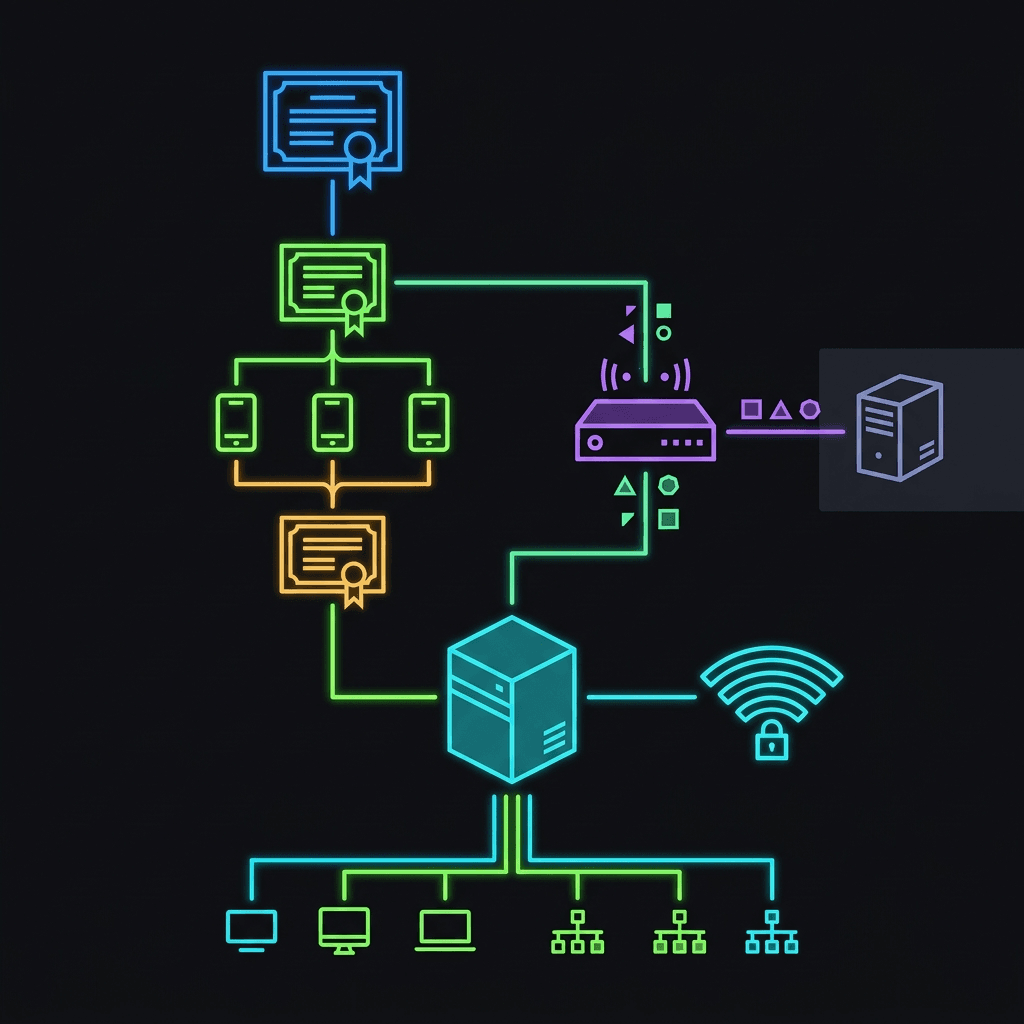
What this deployment tries to solve
- a certificate chain that endpoints trust before enrollment
- a certificate issuance flow that matches the device identity source
- a Wi-Fi profile that uses the issued certificate instead of a password
- a wireless topology where the FortiGate and RADIUS roles are explicit
- a rollback posture that does not assume the production SSID can be modified before validation is complete
The architecture chain
Root CA and Issuing CA
Endpoint trust for the certificate chain
SCEP and the client device certificate
- Microsoft Learn | Cloud PKI overview
- Microsoft Learn | SCEP certificate profiles
- Microsoft Learn | Intune certificate overview
Private key storage and KSP considerations
- TPM 2.0: hardware-bound keys with hardware-based protection, ideal for corporate-owned devices requiring strong assurance
- Software-based keys: stored in the OS key storage, less secure but more flexible for scenarios where TPM or HSM is unavailable
- HSM-backed keys: keys protected by external hardware security modules, highest assurance but requires additional infrastructure
- TPM: hardware isolation, anti-hammering protection, bound to specific hardware
- Software: OS-level access controls, optional encryption at rest, dependent on platform security
- HSM: physical tamper resistance, strict access logging, cryptographic boundary enforcement
- Kiosks and shared workstations: TPM-bound keys prevent credential roaming and ensure device-specific authentication
- User-bound devices: software or HSM options may be preferred to support roaming profiles or certificate renewal
- Scenarios without TPM: software-based keys are the fallback, compensated by MDM policies and additional access controls
- TPM keys require compatible TPM 2.0 firmware and proper endorsement key hierarchy
- Software keys depend on device encryption status and user account protections
- HSM implementations need additional client-side middleware and driver support
Certificate revocation and chain lifecycle
RADIUS, EAP-TLS trust, and the FortiGate role
- Fortinet Community | 802.1X wireless certificate-based RADIUS authentication using NPS with FortiAP
- Fortinet Docs | FortiAuthenticator RADIUS with certificates example
- Fortinet Docs | FortiWiFi client mode EAP-TLS
The choices the article cannot avoid
- Device auth versus user auth
- RADIUS product and topology
- FortiGate role: controller/AP versus RADIUS validator
- target OS and management path
- private-key storage and HSM context
- subject and SAN mapping by device join type
- certificate revocation expectations and network reachability
Intune enterprise Wi-Fi profile
Pilot rollout as a control, not a checklist
- 5 to 10 devices spanning the target OS mix
- a separate test SSID that is not the production SSID
- explicit confirmation that trusted certificate profiles are on the devices before SCEP enrollment
- explicit confirmation that SCEP-issued certificates chain to the Issuing CA
- confirmation that pilot devices reach the RADIUS server and validate its certificate
- a revocation test showing access is denied within the expected CRL window
- a stated rollback action that does not modify the production SSID
Validation checklist
- Confirm Cloud PKI licensing and Root plus Issuing CA hierarchy.
- Confirm the trusted certificate profile is deployed before any SCEP profile.
- Confirm the device or user certificate choice matches the Wi-Fi authentication model.
- Confirm SAN mapping matches the device join type and identity source.
- Confirm the RADIUS server certificate is trusted independently on the device.
- Confirm pilot devices complete EAP-TLS authentication through the wireless controller to the external RADIUS server.
- Confirm CDP/AIA endpoints are reachable for revocation checks.
- Confirm a revocation test changes access behavior within the expected window.
- Confirm no production SSID configuration is modified during the pilot.
No-cutover conditions
- trusted certificate profile deployment is verified on pilot devices
- SCEP enrollment is verified with correct subject/SAN mapping
- EAP-TLS authentication succeeds from the wireless controller to the external RADIUS server
- RADIUS server certificate validation succeeds on pilot devices
- revocation behavior is confirmed
- the pilot has remained stable for 14 days
Rollback considerations
- disable the test SSID
- remove the pilot certificate and Wi-Fi profiles from the pilot group
- leave the production SSID unchanged until an explicit cutover decision is made
Sources
- Microsoft Learn | Cloud PKI overview
- Microsoft Learn | Configure Cloud PKI certificate authorities
- Microsoft Learn | Configure bring-your-own CA (BYOCA)
- Microsoft Learn | Trusted certificate profiles
- Microsoft Learn | SCEP certificate profiles
- Microsoft Learn | Intune certificate overview
- Microsoft Learn | Configure Wi-Fi profiles
- Microsoft Learn | Windows Wi-Fi reference settings
- Fortinet Community | 802.1X wireless machine-certificate RADIUS authentication using NPS with FortiAP
- Fortinet Docs | FortiAuthenticator RADIUS with certificates example
- Fortinet Docs | EAP-TLS support on FortiWiFi client mode